AI Agents vs AI Assistants: What Australian Small Businesses Need to Know
By Ramy Morcos · · 9 min read
Tuesday morning. A retail owner, a childcare director, and a clinic manager each open the same three tabs: inbox, roster spreadsheet, and a cloud chat window. They ask the chat to draft a shift email. It does, but they still copy last month's roster by hand, check Xero for overdue invoices, and write follow-ups themselves. The assistant answered one question. The work queue did not shrink.
That gap is why Australian small businesses are asking a sharper question: do I need an AI assistant, an AI agent, or both running on-site?
> Quick answer: AI assistants answer when you ask. AI agents plan and act toward a goal without you prompting every step. Most SMB admin pain needs agent-style workflows with assistant-style chat for exceptions.
At a glance
→Assistants are reactive: one prompt, one reply, you drive every next step.
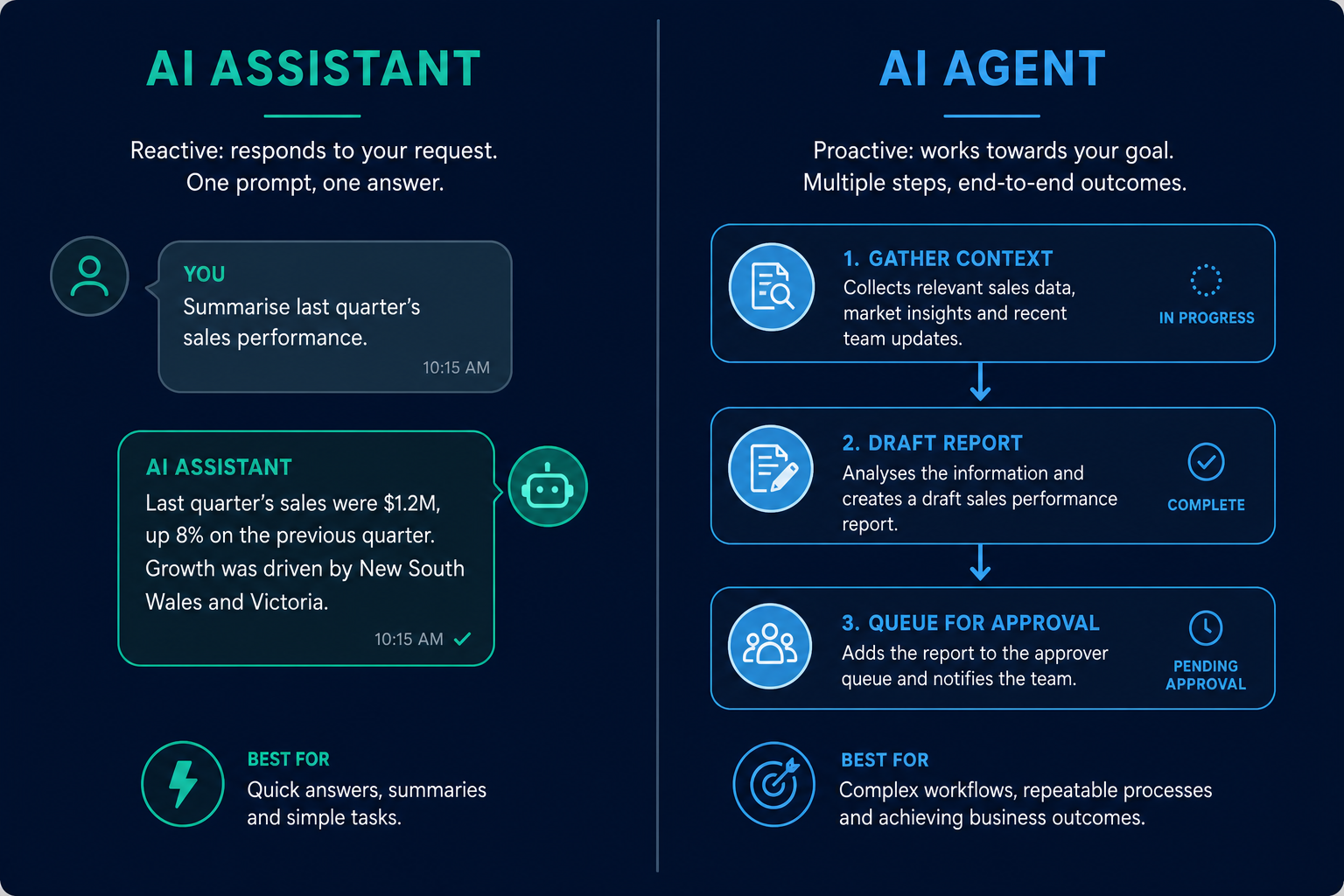
→Agents chain tasks (gather context, draft, queue for approval) toward an outcome you set.
→Five admin jobs (roster, invoice chase, enquiry reply, briefing, recalls) benefit most from agent workflows.
→Risks rise when agents send without approval or process data offshore without clear custody.
→On-premises deployment matters when rosters and customer data must stay in your building.
In this article
→What is an AI assistant?
→What is an AI agent?
→How do assistants and agents compare on five admin tasks?
→What are the benefits of combining both?
→What are the risks and honest limits?
→What should Australian SMBs ask vendors?
→Where does on-premises fit?
→The bottom line
What is an AI assistant?
An AI assistant is software that waits for your instruction and responds to a single request. You type or speak a prompt; it returns text, a summary, or a draft. It does not independently pursue a goal across your tools unless you prompt again for each step.
Think of a receptionist who answers when you walk up to the desk. Helpful, fast, and entirely dependent on you initiating every conversation. Cloud copilots in a browser tab are classic assistants: strong at rewriting a paragraph, weak at running your Monday morning without ten separate prompts.
Trait
AI assistant
Trigger
You ask
Scope
Usually one turn
Integrations
Often copy-paste
Best for
Quick drafts, research, rephrasing
Weak at
Multi-step ops workflows
Assistants shine when the task is narrow and you remain in control of every action. They struggle when the real job is "prepare Monday" rather than "write one email."
What is an AI agent?
An AI agent is software that works toward a goal with multiple steps and less constant prompting. It may gather context from calendars, inboxes, or accounting tools, draft outputs, and queue them for your review. You set the objective; the agent sequences the work.
Think of an operations coordinator, not a Hollywood robot. The coordinator does not wait for you to ask about every invoice. They compile the overdue list, draft chasers, and put them in your approval tray. You still decide what sends.
Trait
AI agent
Trigger
Goal or schedule
Scope
Multi-step workflow
Integrations
Inbox, accounting, rostering
Best for
Repeatable admin with approval gates
Weak at
Judgement calls without human sign-off
Agents are not autonomous senders. You approve customer-facing messages before they go out, especially anything regulated under Australian privacy law.
Side-by-side comparison of assistant chat versus agent workflow nodes
How do assistants and agents compare on five admin tasks?
For each task below, the pattern is the same: assistants help with one slice; agents assemble the slice into a workflow you can approve in one sitting.
Roster and shift emails
Assistant: Drafts a generic email if you paste the roster. You still build the roster elsewhere.
Agent: Reads last month's pattern, proposes shifts, flags conflicts, and queues one approval bundle. You edit and send.
Invoice and payment chase
Assistant: Writes a polite reminder if you paste invoice details.
Agent: Pulls overdue items from accounting, drafts tiered follow-ups (friendly, firm), holds all until you approve. Nothing sends automatically.
Website and enquiry replies
Assistant: Answers a FAQ if you paste the visitor's question.
Agent: Matches enquiry intent to your pricing rules, drafts a personalised reply, and routes urgent leads to your phone.
Agent: Compiles inbox highlights, calendar conflicts, and open tasks into a single briefing on a schedule. You skim and act.
Recall and compliance follow-ups
Assistant: Rewrites a template you provide.
Agent: Tracks who is due, drafts personalised messages, and timestamps approvals for audit. Critical for pharmacies and professional services.
Task
Assistant
Agent
Roster
Draft email only
Pattern + draft + queue
Invoice chase
One-off text
Pull overdue + tiered drafts
Enquiry reply
Single answer
Intent match + routing
Briefing
Summarise one doc
Scheduled multi-source pack
Recalls
Template rewrite
Track, draft, audit trail
What are the benefits of combining both?
The best SMB setup uses agents for repeatable workflows and assistant-style chat for exceptions. You do not want an agent guessing on a sensitive customer complaint. You do want an agent handling the eighty percent of roster emails that follow last month's pattern.
Time back without losing control. Agents compress three hours of Sunday admin into twenty minutes of Monday approvals. Assistants handle the one-off wording tweak inside that bundle.
Clearer accountability. When every outbound message waits for approval, you retain legal and reputational control. Agents propose; owners dispose.
Lower training burden. Staff interact with a familiar chat surface for edge cases while agents run in the background. New hires learn one approval screen, not six tools.
Privacy alignment. Combining both on hardware you control means rosters and customer threads are not pasted into random cloud tabs.
Agents are not free labour. They introduce risks assistants avoid because assistants do less.
Send-without-approval. Any vendor that emails or SMS customers automatically should be disqualified for SMB use. One wrong roster message costs more than a year of subscription.
Offshore document processing. Pasting payroll, patient lists, or supplier contracts into a US-hosted chat makes you the custodian of data you no longer control. The Privacy Act 1988 does not pause because the tool is convenient.
Over-automation of judgement. Disputes, clinical questions, and pricing exceptions need humans. Agents should draft; they should not negotiate.
Integration fragility. An agent that only works when you manually export CSVs is an assistant wearing a costume. Demand live connections to the tools you already use.
When assistants alone are enough. If you need occasional rephrasing and have no repeatable admin queue, a simple assistant may suffice. Agents earn their keep when the same workflow runs weekly across dozens of recipients.
What should Australian SMBs ask vendors?
Before you pilot, put these questions in writing. Vague answers are a filter.
1.Where is inference run? On your hardware, vendor cloud, or both?
2.What can send without a human click? The answer should be "nothing customer-facing."
3.Which systems integrate natively? Xero, MYOB, Microsoft 365, Google Workspace, rostering tools.
4.What happens offline? Drafting should continue; only sync waits for connectivity.
5.How are approvals logged? Timestamp, user, and message ID for audit.
6.What is the kill criterion for the pilot? Hours saved per week or stop.
If you are still choosing between advice, product, and bespoke build, start with the edge AI adoption roadmap before you sign a multi-year contract.
Where does on-premises fit?
Cloud assistants are everywhere. They are also optimised for vendors' scale, not your data custody. For admin workflows that touch customer email, payroll, and supplier terms, processing on hardware in your building closes the gap between "AI helped me draft" and "AI ran my Monday."
On-premises agents draft locally. You approve before anything sends. Integrations read accounting and inbox metadata without exporting your books to a third-party training pool. That architecture is what we call an on-premises AI employee, and it is the model behind NeuraMate.
NeuraMate targets owner-operators and small teams who repeat the same admin every week: roster churn, invoice follow-ups, enquiry replies, briefing packs. It is not a general research chatbot. It is workflow assistance with approve-before-it-sends control and Australian support.
The bottom line
The question is not "assistant or agent?" It is "which workflows need multi-step help, and who approves before anything leaves the building?" Australian SMBs that answer both will save admin hours without trading privacy or control.